
This is the personal blog of Brian Enigma, a guy living in the Pacific Northwest who likes technology, alcohol, and industrial music. For more information about me, please see the "About" page.
iPhone car mount, status update 1 (No Comments)

As you probably don’t know, I’m working on a car mount for my iPhone. I saw an instructable on how to make one that seemed nice, but I’m not keen on the velcro and I’m not sure I kept the plastic packing piece it requires. I also spied a mounting solution from ProClip that seemed really nice. They sell mounts as two interlocking pieces, one to hold your phone or MP3 player (almost any phone or player) and one to hook into your car (all sorts of cars.) Because they’re two pieces, you can match any car to any player, but they’re pricey. Their Eclipse Spyder solution is pretty much a shim that slips in just under the A/C duct, which I made a mental note of.

I figured that for a much lower price, I can make a similar shim-based solution.

iPhone car mount, in progress 2

iPhone car mount, in progress 1

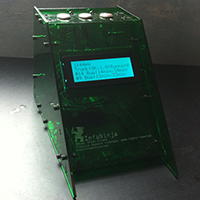
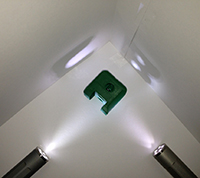
This is, effectively, a single sheet of solid plexiglass and three sheets with an iPhone-shaped hole. As you can see, the shim isn’t mounted yet. You can probably also see the couple of cracks that say “yes, sir, this is my first time working with plexiglass.” You may additionally notice that some of the cuts are not exactly straight. I’m still learning. Total cost of plexiglass and (unpictured) shim: about $6. Fortunately, I already had the tools and other hardware.

IntelliScreen (No Comments)

IntelliScreen.pngHoly cats, IntelliScreen is the coolest iPhone hack since… um… sliced bread?

Dodgeball to Brightkite, take 2 (No Comments)

Ignore the Dodgeball-to-Brightkite migration hint I posted the other day about checkin notifications. I said to go into your Notifications settings and say “Friends Only” and make the area really, really wide.

It turns out that there is a better way. Go to your list of friends and find the friends you’d like to be kept aware of. Click on “Edit friendship” and a whole slew of detailed options comes up. Click the “SMS” checkbox next to “Checkins” and you’ll be informed of their checkins, no matter where in town that person is. Now might be a good time to revert the change I suggested in that previous post.

Also: my three invite slots have filled again. Let me know if you’d like one.

Scarlett Covering Tom (No Comments)

I guess the Scarlett-Johansson-covering-Tom-Waits album is available for listening, for those that enjoy aural pain.

Email Update #2 (No Comments)

Back in September, I issued a warning about my email address. If you have me as enigma@ in your address book, you should change that to brian@. As of today, I’m officially shutting down the enigma@ address. (Not that I’ve looked at it recently, anyway–it’s pretty much just spam at this point.)

LJ Comments (No Comments)

Dear LiveJournal peeps,
There are many of you (I’ve specifically run into this with sakkaranoush and torgo_x) who have journals that don’t allow OpenID people to leave comments. You’ve friended me and so I can see protected entries, but I’m unable to write a comment. Looking through the FAQ, I see this info:

Currently on LiveJournal, OpenID comments count as anonymous comments for the purpose of allowing comments and as comments from registered users for the purposes of screening comments. To allow OpenID comments, a user must also set his or her account to allow anonymous comments. There is no way to allow a specific OpenID account to comment without enabling anonymous commenting.

It looks like you need to go to your “Comment Settings” and then “Enable commenting from Everybody.” Optionally, you can enable screening. Or you can do nothing at all and your journal remains read-only for me.

Pictures, Invites, and Question (1 Comment)

Pictures!

This is my entry in the ColorWars reverse-caption contest:
Mark always had trouble giving people the Evil Eye

It was warm and sunny this afternoon. Everyone was enjoying it.
sunny windowsill

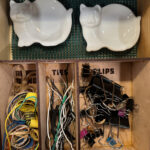
It’s amazing what a little work and less than $20 worth of supplies from the hardware store can do to get you more organized. This is my “network closet” (you can’t really see the LAN patch panel, off frame to the right) that also holds all my tools. Previously, all of these hanging things were rattling around in the bottom of a toolbox. If I wanted a particular tool, I would have to dig for it in the box and hope I didn’t catch myself on a saw blade.
network and tool closet

Brightkite

I am now on Brightkite. I have officially stopped using Dodgeball. I’ve turned off my Dodgeball notifications and will no longer post there. Brightkite is similar to Dodgeball, but different. A few things that might be of interest to Dodgeball-to-Brightkite refugees:

* The “@placename” style checkin only works if you’ve already set up your own personal place names. Otherwise you have to do “?business” to get a listing, then select 1, 2, 3, etc. to choose the specific one. It’s an extra step, but it does ensure that you’re checking in to the correct place. But you really do want to set up “@placenames” for the places you visit most frequently.
* By default, you only get notifications from people very close to you (within about a block), whether or not they’re friends. If you want more of the Dodgeball feel of what your friends are doing around the city, you need to go to “Account Settings: Notifications” and change the radius to “Area (4000 meters)” and the who to “Friends”.
* I’m temporarily sharing my checkins to my Twitter stream, but may not continue to do this long-term.

I have one extra Brightkite invite if you’d like one. I expect to be getting three more soon. (They keep giving me three invites every so often.)

The Passively Multiplayer Online Game (PMOG)

The Passively Multiplayer Online Game or PMOG is a very interesting diversion and I especially like the steampunk theme it uses. The game itself is played through a toolbar in your web browser as you surf the web. As you visit unique sites (or, at least, unique top level domains), you get datapoints (the form of cash used in the game.) You can then spend that cash on items and equipment. In its simplest form, you can deposit items on pages for other people to pick up or set off. For instance, you can leave a bunch of mines on digg.com and the next person who comes along (that is playing the game) trips those mines and had better have some armor. You can leave a crate of cash and armor. You can also take missions and even create them. In this context, a mission is a path across several web pages with a little bit of narrative text to pull them together. For instance, I made a Sudoku mission last week that took you around to places with rules, strategy, and higher quality daily puzzles. You can think of it as a sort of “user generated content” variant of the good ol’ webring (remember those?), but dynamic and voted upon, so you’ll know which ones are good and which are lame. The missions (and portals, which are like one-website missions) can be sought out and taken–but even nicer is the way you can stumble across a mission. If you visit a web page that is a component of a larger mission, your toolbar will notify you of the mission. I’ve found the mines and armor to be great for shallow surface entertainment, but the serendipitous linkages you get from stumbling across missions is a much more satisfying level of fun. For instance, if I were some player that went to the New York Times daily sudoku puzzle, I’d be informed of a related mission. If I took that mission, I might learn that USA Today also has a decent daily puzzle page, or I might learn about a cool online step-solver (that shows you HOW to arrive at a difficult answer without blatantly jumping you to the final the answer.)

Overall, it’s a fun little diversion. Right now, I’m not actively trying to level-up and earn points and badges. As the game’s name implies, I’m passively playing, and having fun doing so.

If you’re interested, I have several invites.

Veganism?

I know that a number of people reading this are vegetarians. I believe a few are also vegan. My question to you is: why? Why did you go the extra mile from being vegetarian to vegan? As I understand it, for most people, it’s a moral choice–for instance, cows in “factory farms” hooked up to milking machines is arguably not the most humane way to treat them. If this is your reason, though, would you eat milk and cheese from a local farm that you know treats their animals well? Are eggs right out, because they’re going to become baby chickens, or would it be different if they were free-range or if they were from hens you kept yourself?

Political Feature Matrix (1 Comment)

question blockThe Oregon primary ballots are due soon. “Soon?” Yes, for those unfamiliar with our system up here, everything is done by mail or by drop-off. There’s no polling place and polling date, just a mail-in deadline. I think the government might think that the November weather might be too cold, wet, and dreary for people to traverse it to go vote–so we vote by mail, even in the primaries. We’re also not trusted to pump our own gasoline. Anyway, I have a gut feeling about who I’m voting for, but I’d really like to have a bit more rationality behind it.

And now a bit of a sidebar…

In my line of work, the sales and marketing folks use a particular style of comparison called a “feature matrix.” You might have seen these kinds of things before, as they’re not just relegated to the tech sector. You start with a grid or table with labels across the top and sides. One axis is a list of the competing products or services being compared–say a TechMaster SuperWidget 3000, a Bambleweeny 57 Sub-Meson Brain, and a Yoyodyne oscillation overthruster. The other axis is the set of features being compared–power source, number of serial ports, top spacial speed, top temporal speed, etc. The main content of the grid consists of checkmark boxes to say yes, this product has this feature or numbers to convey similar information (the widget has 2 serial ports, but the overthruster has 3.)

When feature matrices are used correctly, they present an impartial and objective comparison between products. When they’ve been giving a marketing department spin, eh… not so much with the fair-and-balanced. Categories–quite often entirely useless ones–might get chosen to make one product appear better and more feature-rich than the others. Oh, look, the overthruster is the only product with polarized filters over the display so that you can read it cleanly outdoors, even under direct sunlight. Wait, what? Who’s going to use any of these products outdoors? But it does give you a feature checkmark for one product that none of the others have. You get enough of those, and at first glance, it looks like one product is much better than others.

…and that’s then end of my sidebar.

So, dear inkernet, I ask you: where can I find a reasonably unbiased feature matrix of the candidates? Ideally, it would have Hillary and Obama (and perhaps others?) along one axis and issues (war, taxes, spending, abortion, death penalty, etc.) across the other. The main content of the table would then be brief descriptions of each candidate’s stance on each issue. Extra special super bonus if references are cited so that inquisitive readers can consult the primary sources of the summarized data.

Self Checkout (No Comments)

Corporate AmericaI have always had mixed feelings about self checkout lines. I first saw them in supermarkets as a sort of super-express-lane. Or more specifically, a quintuplet of super-express-lanes because they usually cram four of them together. At the time, they were only in supermarkets. I was in my mid 20s and thought they were great! …mostly. My typical workday was pretty late and the supermarket was open 24-hours so it was easy to grab a few things for dinner and race through checkout. During the day, it was a little bit annoying because you’d get somebody with a heaping cart full of a week’s worth of groceries trying to use them (ignoring the 15-items-or-fewer signs, with no reprimand by the one overworked employee operating all four stations) or you’d have Grandma in front of you, prodding at the touch screen with an unsure finger and spending entirely too long in trying to find the barcodes on her items, confused by the newfangled computer checkout. Overall, though, for me at that time in my life, it was new and novel and useful.

These days, I find them annoying at best and frustrating at worst. First and foremost, the novelty has worn off and the quirks in the system have become much more visible. For every item you scan, the pressure-sensitive table holding the plastic bags needs a bit more weight. This is true whether it’s a lightweight box of band-aids that’s too small to register weight or a rake that’s too big to put on the table. Virtually every operation seems like it needs an override by the overworked employee who’s minding all four stations. Add to this the moral and philosophical issues dangling over the situation. The small amount of time savings going through self-checkout versus an express lane is a huge cost-savings for the supermarket. To install self-checkout, they’ve removed a few lanes (presumably some of the express lanes), decreasing their cashier staff by a few, and transition the gruntwork from the checkers on to you! The whole thing smells a little too much of corporate greed to me. To top it all off, you usually get zero human interaction during self-checkout. At best you get a nod and a “hey” from the overseer employee. That person rarely even talks to you when doing those aforementioned override operations.

Given all of this, I gravitate away from the self checkout lanes these days. Last night, on my way home from work, I stopped by a big-box hardware store that uses a few of these lanes. I have always avoided them in the past because they offered conventional checkout options, but last night the only open lanes were self-checkout! And the majority of stuff in my cart was large-ish. As I pondered how to best get the barcode end of the edger and stand-up weed puller to the scanner glass without damage to the items or machine, the overseer lady came along with a wireless barcode reader. Because she was rushed (by other customers with other issues), she proceeded to scan stuff directly in the cart without going through that whole routine of removing it from the cart, scanning it, then bagging or tagging it. I carefully watched as she proceeded to scan items. Of course, given this particular methodology, human error came into play. She didn’t double-scan anything, but did miss a few things.

As is customary in self-checkout lanes, nothing more than a few grunt-like words were said to me and I never spoke a single word throughout the whole transaction. Minimal-to-no communication feels like the social contract of this particular kind of transaction choreography. I keep telling myself that I’m not a thief-via-inaction and I’m starting to believe it.

Historic Photos of Portland (No Comments)
Historic Photos of Portland

As I mentioned before, I find myself the owner of a book entitled Historic Photos of Portland. I guess they have a whole series with various cities in the US. I’ve been meaning to pour through it for the past few weeks, but between busy weeks and busy weekends, I never had the time. The one time I did have a few moments, I couldn’t find it! (Kim had carried it away to read for herself!)

First, I was a little surprised when I entered it into my bookkeeping system (yes, I catalog all of my books) and found it sat alongside another book I own from the very same author! I had picked up Progressive Portland - On The Move from Powell’s years ago, read through it, then forgot I owned it. The layout is very similar to the Then and Now post I made last month. It was probably subconsciously inspired by the book’s format. This new book skips the then-and-now format and shows full-page pictures of how Portland used to look

At any rate, it looks like this author (Donald R. Nelson) scours the various archives around Portland for old photos and makes amazing picture books from them. Historic Photos of Portland is no exception.

The book is split into chapters by time period:

  • Pre-Civil War to the End of the Nineteenth Century (1860-1899)
  • The City at the Turn of the Century (1900-1919)
  • A Developing Metropolis (1920-1939)
  • From 1940 to a Modern City (1940-1970s)

I definitely have to say that the more visually interesting chapters are the first–the furthest back in time. For the most part, though, they are also the most “detached.” The photos seem like they could have been taken anywhere because there are few landmarks (natural or man-made) that anchor the pictures to something known in the modern world us Portlanders live in. The more modern photos have recognizable locations, but also a more mundane quality to them–mainly because the objects, architecture, and clothing are not terribly foreign. We’ve all seen classic 50s cars and land-boat 70s gas guzzlers. Asphalt roads and concrete buildings are pretty standard.

Anyway, starting with the eldest photos, the city really isn’t recognizable as any sort of metropolis. It pretty much consisted of what’s now downtown, but the layout was mostly Victorian mansions on city-block-sized yards. We have a rather green downtown today, as far as cities go, but back then, it was almost nothing but green! There were dirt streets, horse-drawn carriages, well-dressed men (very few pictures of women aside from a shopkeeper or two–I guess they were all at home doing womanly things), and even a (Steel) bridge! I didn’t realize it, but Skidmore fountain was built in 1888! The first of many documented floods was in 1894–the water level went about half-way up the ground floor of buildings.

The early 1900s brought more people and more commerce. There’s a great photo of the streetcar in 1904 that’s similar to one I’ve seen elsewhere (perhaps a historic photo on the bus or streetcar?) Typically, when I think of streetcars, I think of busy streets, tall buildings, and people around. In these photos, it’s just a streetcar on a pair of rails that stretch off toward the horizon. There are miles of fields without a single building in sight. The only visible human is the streetcar operator. That seems to me like a very lonely streetcar. This era brings more ships and a few cobblestone roads.

In the roaring 20s and great depression, the city becomes a bit more recognizable. There’s a great picture of “the brand new Burnside bridge!” I used to walk that all the time and it looks the same then as it does now (well, “now” being about a year ago–it’s been under construction/repair for a while.) There’s a photo of the St. John’s bridge as it’s under construction. The suspension cables are all there, dangling down, but they are not attached to any sort of deck or road. It’s kind of freaky looking!

The 40s through 70s is pretty much what you would expect it to be. I’d really like to say something extra about it, but none of the photos struck me as anything worthy of special mention.

Overall, it’s a really nifty book. I’ve been craving information about the history of Portland recently and this satisfies a good chunk of that. I have to say that I was a tiny bit disappointed that it was primarily a picture book–the text in it amounted to captions and a few paragraphs starting each chapter–but I think that whole internet thing of not being able to browse it first caused me to set my expectations a little incorrectly. To further my knowledge of Portland history, I think that next time I’m at Powell’s I will see if I can find something with a little more text and stories. Regardless, the pictures are a great taste and are easy to quickly show off to friends and family. It’s a great book and will have a heartfelt home on our coffee table!


Bad Behavior has blocked 1597 access attempts in the last 7 days.

Rodney's 404 Handler Plugin plugged in.

Akismet has caught 1,379 spam messages.